

Policy, servicing, documents, BDMs. One subscription.
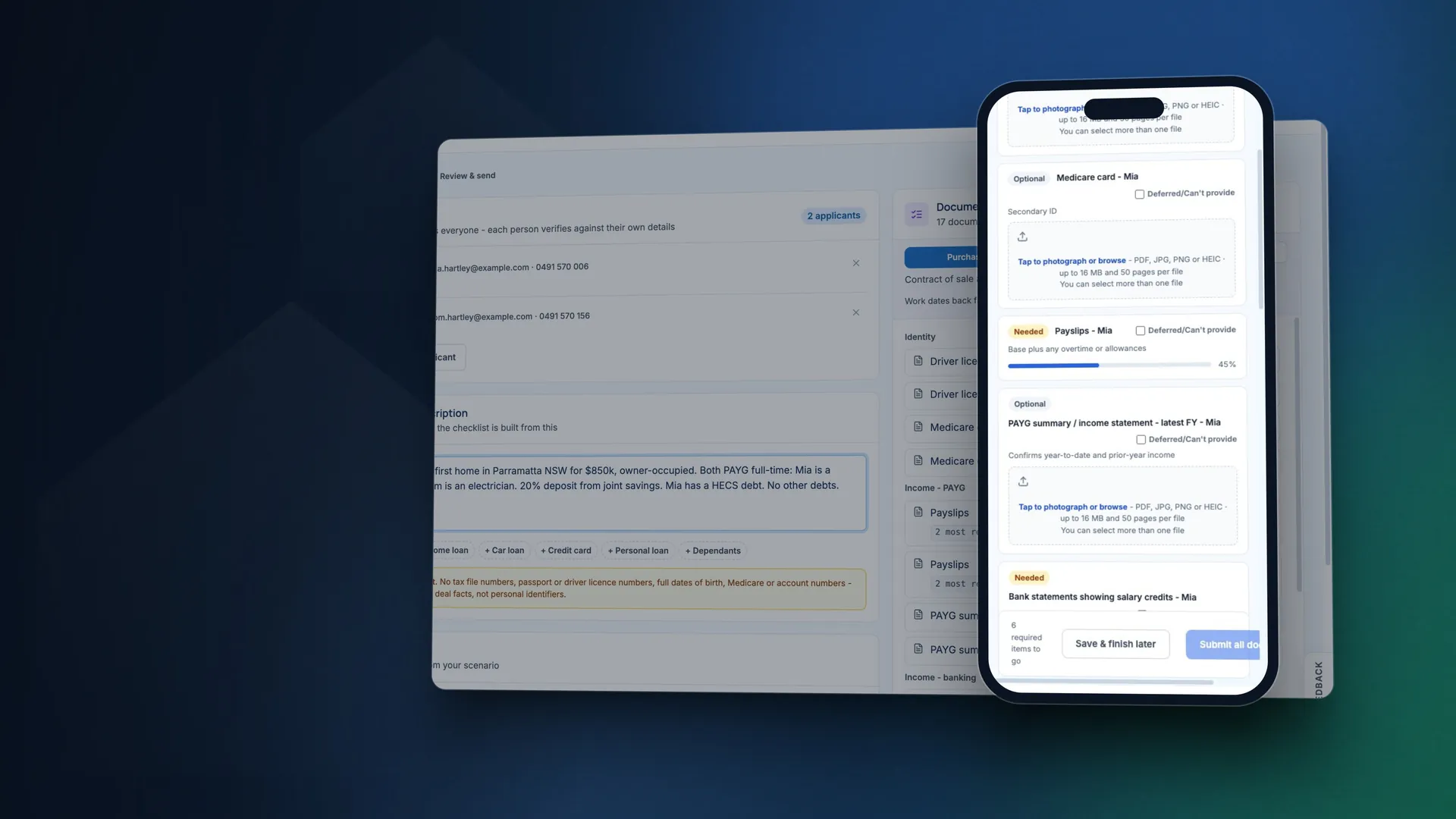
Describe the deal. broQA chases the documents, reads them, drafts the application and runs a policy review. You check the work and make the call.
Your client opens a secure link, confirms a 6-digit code and uploads from their phone. No app needed.
See how Info Requests worksAsk in plain English about one lender or several. Policy answers are written to cite the source page.
See how Chat worksCapture the scenario once and compare borrowing across lenders, each assessed its own way.
See how Servicing worksTurn the client's documents into a draft application, with gaps, mismatches and signs of editing flagged.
See how Application Preparer worksFind the BDM, turn two lines into a clear scenario email, and send it from your own mailbox.
See how BDM Connect worksFilter home loan rates by LVR, purpose and repayment, or show your panel only, with the date of the latest check.
See how Rates worksAsk a policy question on WhatsApp between meetings. Answers come from the same library as Chat.
See how WhatsApp worksRead what each lending story may mean for brokers, then turn it into a draft post to review.
See how News works14 days free, no credit card. Then $69 + GST a month per user.
Real broQA screens with made-up clients. Results are a guide to confirm with the lender.
One subscription instead of several
Many brokers juggle several tools, logins and bills for this work, and pay someone to chase the paperwork. broQA brings the tools into one subscription, so you and your assistant start from a draft instead of a blank form.
- Policy researchChat
Plain-English answers on lender policy, for one lender or several, written to show the source page.
- ServiceabilityServicing Beta
One scenario, keyed in or read from payslips and financials, compared lender by lender, each assessed its own way.
- Document collectionInfo Requests
A document list built for the deal, a secure link and 6-digit code for each applicant, and reminders sent for you.
- Application draftingApplication Preparer Beta
A draft application from the client's documents, with gaps, mismatches and signs of editing flagged for your review.
- BDM contacts and emailsBDM Connect
A BDM directory by lender and state, and AI-drafted scenario emails sent from your own Outlook or Gmail.
- Rate trackingRates
Home loan rates by LVR, purpose and repayment, with a filter for your own panel.
- News and postsNews
Lending news with a note on what each story may mean for brokers, ready to turn into a draft post.
- Policy on the goWhatsApp
Policy answers on WhatsApp, from the same library as Chat.
- Hand-offsBetween the tools
Client documents carry on into Application Preparer and start a Servicing case for you to complete, and a Chat answer can become a BDM email.
Every tool on one plan: $69 + GST a month per user. It works alongside your CRM and your aggregator's tools.
Start free trialSix steps. Two of them are yours.
You describe the deal and you make the call. In between, your client uploads from their phone and broQA chases, checks, reads and drafts.
- 1You
Describe the deal and check the list
In your own words. broQA builds the document list and gives the reason for each item. You check it and send it, from your own mailbox if you connect it.
- 2Your client
Uploads from their phone
A personal link and a 6-digit code. No account and no app. Each applicant gets their own list.
- 3broQA
Chases for you
Reminders go out on days 2, 5 and 9 unless you change them, and skip anyone who has just been active. If someone stalls, you hear about it.
- 4broQA
Checks every file
A virus check first, then signs of editing where the file allows it. Then it reads the documents and pulls out the figures.
- 5broQA
Drafts the application
A draft application in Application Preparer, and a policy review you can keep questioning in Chat.
- 6You
Review and decide
See what's ready, what's missing and where documents disagree. You check it, and you make the call.
Policy questions and BDM emails are a click away: ask Chat, open the source, then send it to your BDM. See how Info Requests works
What your licensee will want to know
The Security page has the detail, ready to send to your licensee.
See how broQA protects client dataData is encrypted on its way to broQA and when it's stored in our database and file storage. Each account has one active session, and we email you when a new device signs in. You can turn on two-factor sign-in in Settings. We don't sell your data, and brokers outside your firm can't see it. The Security page shows which broQA staff can.
See the working for yourself
Policy answers are written to cite the source page. Open it and check.
broQA checks payslips, statements and tax documents for signs of editing and tells you what it found. The call is yours.
Click through the documents, the policy answer, the servicing run and the BDM email on one made-up deal. Tap a citation number to see the source.
A made-up deal: the lenders, people, policy wording and figures are invented to show how broQA answers.
One lender accepts this as standard policy at 88% with LMI. One more may, and that's a question for the BDM.
- Lender A accepts one year of financials once the ABN is 12 months old, up to 90% LVR with LMI , and counts casual income after 6 months in the role .
- Lender B asks for a 24-month ABN as standard, and allows 18 months with an accountant's letter . Its guide doesn't say whether that holds above 80% LVR, so ask the BDM.
- Lender C doesn't cover this case in its documents.
Source 1 (made up)
Source 2 (made up)
Source 3 (made up)
In the app, hover a citation to see the page and click to open the PDF. Here, tap a number to see the source. The wording is an example.
| Document | From | Status | Checks |
|---|---|---|---|
| Driver licence, front and back | Both | Received | No signs found |
| Payslips | Sam | Received | No signs found |
| Tax return, latest year | Jane | Received | No signs found |
| Financial statements | Jane | Received | Review: signs of editing |
| Bank statements | Both | Pending | - |
| Contract of sale | Both | Can't provide yet | Waiting on the agent |
Auto-reminders
- Day 2Sent
- Day 5Sent to Jane. Skipped for Sam, active in the last 24 hours
- Day 9Next
Client link
Jane and Sam each have their own link and list. No account, no app. They confirm a code and upload from their phones.
| Lender | Max borrowing | Surplus on this loan | HEM used | HECS used | DTI on this loan |
|---|---|---|---|---|---|
| Lender A | $1,041,000 | $2,308 | $5,228 | $312 | 3.5x |
| Lender D | $1,012,400 | $2,154 | $5,181 | $312 | 3.5x |
| Lender B | $994,800 | $1,950 | $5,581 | $298 | 3.5x |
| Lender E | $968,250 | $1,865 | $5,228 | $312 | 3.5x |
| Lender C | $612,000 | -$1,180, short by $136,000 | $5,230 | $340 | 3.5x |
Example figures for a $748,000 loan, showing 5 lenders. Each lender is assessed at its own offered rate. Hover the income, expense, loan and tax columns to see how those figures were built. Results are a guide, so confirm with the lender.
Hi Sarah,
Owner-occupied purchase at $850,000, loan $748,000, 88% LVR plus LMI. Applicant 1 has held an ABN for 18 months and has one year of financials. Applicant 2 is casual, 8 months in the role. Combined income about $215,000.
Our understanding is that your guide asks for a 24-month ABN and allows 18 months with an accountant's letter. Could you please confirm whether that applies at 88% LVR, and whether LMI would need anything further?
Kind regards
From Chat to your BDM
Drafted from the policy answer, so nothing is retyped. You read it, trim it and send it. Replies thread back into broQA.
One made-up deal, followed through four tools. Signed-in brokers see real lender names.
Built for the lenders you use every day
45+ lenders and growing, from the major banks to non-banks and specialists. See the full list, tool by tool.















































broQA
- Info Requests, Chat, Servicing and Application Preparer
- BDM Connect, Rates, News and WhatsApp
Questions brokers ask
What is broQA?
broQA is one AI workspace for Australian mortgage brokers: lender policy, servicing, client documents, BDM emails, rates and news in one login, plus policy answers on WhatsApp. Collect documents through a secure link, ask policy questions with answers written to cite the source page, compare borrowing power lender by lender, and draft the application and the BDM email. Try it free for 14 days with no credit card, then it's $69 + GST a month per user.
How do I check an answer?
Policy answers are written to show their source page, so you can check them in a click. broQA uses AI and can get things wrong, so confirm anything important with the lender. If an answer or a figure looks wrong, tell us and we'll look into it.
Can I use broQA alongside other tools?
Yes. broQA works alongside your CRM, your aggregator's tools and any servicing calculator you already use, and it isn't tied to any aggregator. It brings the research and paperwork before lodgement into one place, and you lodge the way you do today.
Are there limits?
Fair-use limits apply, and they're lower during the trial.
Does my client need an account?
No. They open their personal link, confirm a code sent to their email or mobile, and upload from their phone or computer.
Who can sign up?
Brokers with a current credit representative number, and the people who work for them, using their broker's CRN. Sign-up checks the CRN against ASIC's register, so have it handy. Hold your own credit licence, or having trouble with the check? Email us and we'll look into it.
Do your prices include GST?
No. Prices are shown plus GST, which is added at checkout. We email a tax invoice each month showing the GST and our ABN.
Try broQA on the policy questions you get every week
Then open the source pages the answers cite. Every tool is free for 14 days, and you don't need a real client to try it.
Start free trial Talk to us